Use ModernAstro in ChatGPT and Claude
Ask ChatGPT or Claude about the people saved in your ModernAstro account. The AI app reads the chart from ModernAstro and explains it in plain words.
Before you start
A ModernAstro account with at least one saved person (yourself, family or friends). Add or check your saved people
Connect it
Today, add it to your AI app by hand with this address:
https://mcp.modernastro.com/mcp
- Claude: open Settings → Connectors, choose Add custom connector, paste the address and add it. This works on every Claude plan; Claude's free plan allows one custom connector.
- ChatGPT: add a custom MCP server with the address above and choose OAuth. Adding it by hand needs a paid ChatGPT plan for now.
- A ModernAstro window opens. Sign in. It shows which account you are signed in to; choose Switch account if it is not yours.
- Tick the saved people the AI app may read. Nobody is ticked to start with.
- Choose Allow. You are back in the AI app; ask your question.
Added someone new? Tick "Also let my AI apps read this person" when you save them, or choose Manage people in Account → Settings.
In apps where ModernAstro is listed, search for ModernAstro in the app's directory and connect it.
What you can ask
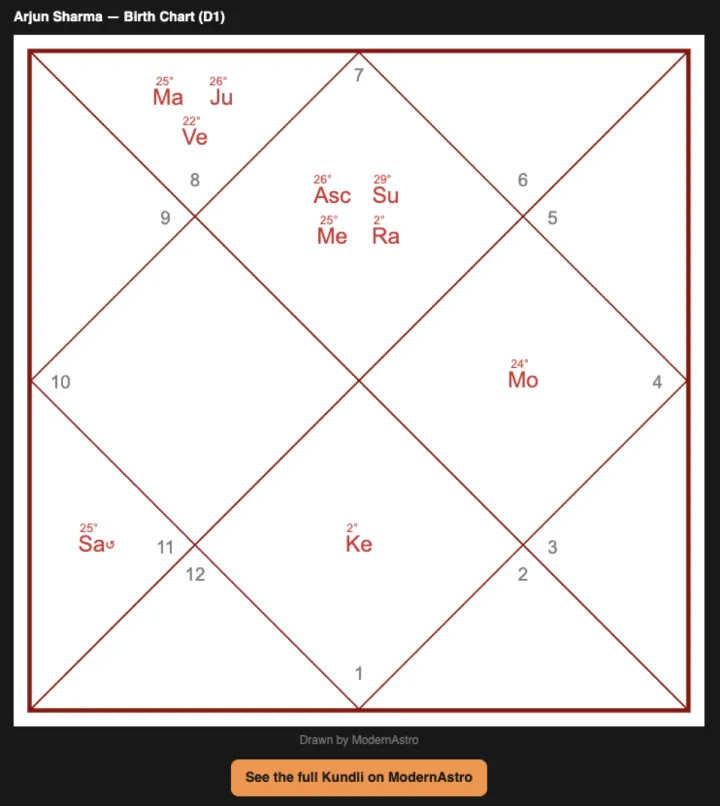
- "Show my birth chart." — the Kundli drawn as a chart, with your ascendant, Moon sign, nakshatra and every planet.
- "Which dasha period am I in right now, and when does it change?"
- "What is today's panchang in Mumbai?" or "Find a good date to move house next month."
- "Do a full Kundli milan for Priya (bride) and Arjun (groom)." — both people must be saved and ticked.
- Slow-planet transits and Sade Sati, yogas and doshas, remedies, and your day's outlook.
- KP, Jaimini, Lal Kitab, a Western natal chart or Chaldean numerology — each answered on its own system.
What it can and cannot see
- It reads only the saved people you tick when you connect. You can connect again to change who is shared.
- It only reads. It never adds, changes or deletes anything in your account.
- It cannot see your password, your payments or the people you did not tick.
- Every chart, date and period comes from ModernAstro's own calculation engine (NASA/JPL DE440). The AI app explains the results; astrology is guidance, not medical, legal or financial advice.
Free and Pro accounts
A Free account can show the birth chart (D1), the birth details (Lagna, Moon sign, nakshatra), today's panchang and the core numerology numbers, up to 10 answers a day.
A Pro account can use every ModernAstro tool, up to 250 answers a day. The daily count resets at midnight India time.
Disconnect
On the ModernAstro website, open Account → Settings and choose Disconnect all AI apps. You can also remove ModernAstro inside the AI app. Changing your ModernAstro password also disconnects every AI app. Disconnecting stops new requests; it cannot recall answers the app already received.
Privacy and help
How ModernAstro handles your data (privacy policy)
Something not working? Write to [email protected]